 Gacfox's Blog
内容管道与资源管理
游戏程序运行时需要各种各样的资源文件,常见的包括纹理图片、音频、字体、着色器等,这些原始文件格式各异,游戏不可能在运行时挨个解析它们,XNA给出的解决方案是使用内容管道(Content Pipeline)统一管理。使用内容管道,游戏程序在构建阶段就会把原始资源统一编译成高效的.xnb二进制格式(XNB是XNA Framework Content Pipeline Binary Data的缩写),运行时则通过ContentManager统一加载,MonoGame也继承了这套机制。
内容管道运行流程
内容管道的工作分为构建期和运行时两个阶段:
构建期:原始资源被Importer(导入器)解析为中间对象,由Processor(处理器)加工转换为运行时类型,最后序列化为.xnb文件。
运行时:反序列化.xnb文件,得到可用对象。
举例来说,一张hero.png经过TextureImporter导入、TextureProcessor处理后变成了hero.xnb,原始图片被转为了一个经过预处理、GPU友好的二进制图形资产结构,游戏里调用Content.Load<Texture2D>("hero"),拿到的就是直接可以绘制的纹理对象,相比直接加载PNG图片能够省去PNG解码开销,图片、音频等各种资源都是如此,大量资源处理为.xnb后,理论上能够大幅节省资源加载时间。这种构建期预处理的思路在游戏开发中其实非常普遍,Unity的AssetBundle也是类似的哲学。
MGCB
前面搭建环境时我们曾介绍过MGCB Editor,MGCB全称MonoGame Content Builder,MGCB Editor是内容管道配置文件的图形编辑工具,工程里的Content.mgcb文件就是内容管道的配置文件,它本质其实是MGCB命令行工具的参数列表。在Visual Studio中,我们双击Content.mgcb就会自动运行MGCB Editor并打开当前配置文件,如果用命令独立启动MGCB Editor,则需要使用命令dotnet mgcb-editor Content.mgcb,或在图形界面中手动打开Content.mgcb。
MGCB Editor界面如下图所示,它分为左右两栏,左侧是资源列表和属性面板,右侧是构建输出。
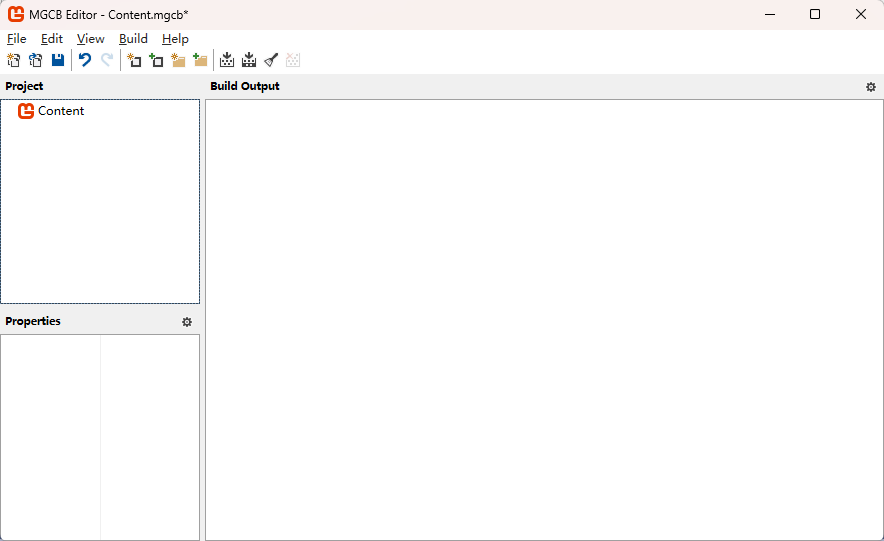
想要添加资源时,以添加PNG图片为例,可以按如下步骤操作:
- 右键点击工程面板中的
Content,点击Add -> Existing Item... - 选择一张图片,例如
Content目录下的hero.png,此时可以在工程面板看到图片被添加进来,点击图片后左下角属性面板显示对应信息,包括自动匹配的Importer和Processor - 点击
Build -> Build,可以看到图片被构建为了hero.xnb,不过工程模板的.csproj里已经配置好了MSBuild任务,启动游戏或打包时会自动构建.xnb并拷贝到输出目录,因此这一步通常不需要手动操作
实际上.mgcb文件就是个纯文本,打开看内容大致如下:
#----------------------------- Global Properties ----------------------------#

/outputDir:bin/$(Platform)
/intermediateDir:obj/$(Platform)
/platform:Windows
/config:
/profile:Reach
/compress:False

#-------------------------------- References --------------------------------#


#---------------------------------- Content ---------------------------------#

#begin hero.png
/importer:TextureImporter
/processor:TextureProcessor
/processorParam:ColorKeyColor=255,0,255,255
/processorParam:ColorKeyEnabled=True
/processorParam:GenerateMipmaps=False
/processorParam:PremultiplyAlpha=True
/processorParam:ResizeToPowerOfTwo=False
/processorParam:MakeSquare=False
/processorParam:TextureFormat=Color
/processorParam:Version=3.8.5.1
/build:hero.png
该文件内容其实很简单,我们完全可以不使用MGCB Editor手动编辑,相关的参数用法可以参考MonoGame官方文档,这里就不多介绍了。
ContentManager
游戏运行时,加载.xnb资源需要统一使用ContentManager类,代码中,它可以通过Game.Content访问。下面例子中,我们加载之前的图片资源,绘制到屏幕上。
using Microsoft.Xna.Framework;
using Microsoft.Xna.Framework.Graphics;
using Microsoft.Xna.Framework.Input;

namespace Gacfox.Demo.DemoGame;

public class Game1 : Game
{
    private GraphicsDeviceManager _graphics;
    private SpriteBatch _spriteBatch;
    private Texture2D _hero;

    public Game1()
    {
        _graphics = new GraphicsDeviceManager(this);
        Content.RootDirectory = "Content";
        IsMouseVisible = true;
    }

    protected override void Initialize()
    {
        base.Initialize();
    }

    protected override void LoadContent()
    {
        _spriteBatch = new SpriteBatch(GraphicsDevice);
        _hero = Content.Load<Texture2D>("hero");
    }

    protected override void Update(GameTime gameTime)
    {
        if (GamePad.GetState(PlayerIndex.One).Buttons.Back == ButtonState.Pressed || Keyboard.GetState().IsKeyDown(Keys.Escape))
        {
            Exit();
        }
        base.Update(gameTime);
    }

    protected override void Draw(GameTime gameTime)
    {
        GraphicsDevice.Clear(Color.CornflowerBlue);

        _spriteBatch.Begin();
        _spriteBatch.Draw(_hero, new Vector2(100, 100), Color.White);
        _spriteBatch.End();

        base.Draw(gameTime);
    }
}
这里要注意,Content.Load中使用的路径不带扩展名,且如果有多层路径,要用正斜杠,例如Content.Load<Texture2D>("audio/jump")加载的是Content/audio/jump.xnb,即使在Windows上也应保持统一,别用反斜杠。
此外我们还要知道,Content.Load具有缓存语义。同名资源重复Load,返回的是同一个对象引用,不会重复占用显存。这一设计很贴心,但也意味着如果你改了这张纹理的像素数据,所有引用者都会看到变化。
如果想要卸载资源,可以调用Content.Unload(),它会卸载该ContentManager加载过的所有资源,注意这里卸载的不是单个资源,MonoGame的资源释放粒度是整个ContentManager。这一功能主要用于分场景使用的独立ContentManager,当切换场景时,我们可以卸载之前场景的资源,以节省内存。
下面代码为某个场景创建独立的ContentManager。
ContentManager sceneContent = new ContentManager(Content.ServiceProvider);
sceneContent.RootDirectory = "Content";
下面代码卸载ContentManager中的所有资源。
sceneContent.Unload();
内置资源类型
不同的资源对应不同的泛型参数和Importer、Processor组合,内置支持的几种常用资源搭配如下表。
| 资源 | 原始格式 | 运行时类型 | 说明 |
|---|---|---|---|
| 纹理 | png/jpg/bmp/tga | Texture2D |
各种图片,最常用 |
| 音效 | wav | SoundEffect |
短促音效,低延迟播放 |
| 音乐 | mp3/ogg/wma | Song |
背景音乐,流式播放 |
| 字体 | .spritefont(XML) | SpriteFont |
MonoGame中文字需要光栅化并生成.spritefont,见后续字体绘制章节 |
| 着色器 | .fx(HLSL) | Effect |
自定义着色器常用于实现特效、特殊渲染效果等 |
自定义内容管道
内置Importer、Processor只能应付常规资源,如果我们想让游戏直接加载自定义资源就需要自定义内容管道。不幸的是MonoGame中自定义资源管道相当复杂,这是因为内容管道是在构建阶段运行的,我们需要独立创建一个类库工程来开发对应的Importer、Processor,MGCB则需要配置这个类库工程编译输出的DLL,所以我们的解决方案划分为如下两个工程。
Gacfox.Demo.DemoGame # 主游戏工程
Gacfox.Demo.DemoGame.ContentPipeline # 自定义内容管道工程
新建的类库工程Gacfox.Demo.DemoGame.ContentPipeline中,由于代码需要引入MonoGame内容管线相关的API,因此需要在.csproj中添加以下依赖。
<ItemGroup>
  <PackageReference Include="MonoGame.Framework.Content.Pipeline" Version="3.8.5.1" PrivateAssets="all" />
  <PackageReference Include="MonoGame.Framework.WindowsDX" Version="3.8.5.1" PrivateAssets="all" />
</ItemGroup>
其中MonoGame.Framework.Content.Pipeline是管道的核心库,至于引入MonoGame.Framework.DesktopGL这个依赖则是因为向.xnb写数据时会用到ContentWriter,它的大量重载中会用到Vector2、Vector3、Color、Matrix、Quaternion等类,C#做重载决议时必须能解析所有重载的参数类型,而这些类型又定义在MonoGame.Framework里,因此需要引入它。
此外,由于引入MonoGame.Framework.WindowsDX,这个框架本身的目标框架是net8.0-windows,我们的类库工程也要兼容这一设置,否则无法编译。如果你用的是MonoGame.Framework.DesktopGL,它的目标框架是net8.0而非仅限Windows,此时类库工程的目标框架默认就行了。
<TargetFramework>net8.0-windows</TargetFramework>
这里以JSON为例进行介绍,我们打算将一个hero.json加入内容管道,我们期望经过MGCB处理后能在主游戏工程里直接用ContentManager获取Hero实例,这里直接给出完整代码。
Hero.cs
namespace Gacfox.Demo.DemoGame.ContentPipeline;

/// <summary>
/// 玩家角色数据。
/// </summary>
public class Hero
{
    public string Name { get; set; }
    public int Level { get; set; }
    public int Hp { get; set; }
    public int Attack { get; set; }
    public int Defense { get; set; }
}
using System.Text.Json;
using Microsoft.Xna.Framework.Content.Pipeline;

namespace Gacfox.Demo.DemoGame.ContentPipeline;

/// <summary>
/// 导入器:把 hero.json 读取为 Hero 对象。
/// </summary>
[ContentImporter(".json", DisplayName = "Hero Importer", DefaultProcessor = nameof(HeroProcessor))]
public class HeroImporter : ContentImporter<Hero>
{
    private static readonly JsonSerializerOptions JsonOptions = new()
    {
        PropertyNameCaseInsensitive = true
    };

    public override Hero Import(string filename, ContentImporterContext context)
    {
        context.Logger.Log($"Importing hero from: {filename}");
        var json = File.ReadAllText(filename);
        return JsonSerializer.Deserialize<Hero>(json, JsonOptions);
    }
}
using Microsoft.Xna.Framework.Content.Pipeline;

namespace Gacfox.Demo.DemoGame.ContentPipeline;

/// <summary>
/// 处理器:对导入结果做简单校验后原样传递给写入器。
/// </summary>
[ContentProcessor(DisplayName = "Hero Processor")]
public class HeroProcessor : ContentProcessor<Hero, Hero>
{
    public override Hero Process(Hero input, ContentProcessorContext context)
    {
        if (input == null)
            throw new PipelineException("hero.json 解析结果为空。");
        if (input.Hp <= 0)
            throw new PipelineException("Hero.Hp 必须大于 0。");

        return input;
    }
}
using Microsoft.Xna.Framework.Content.Pipeline;
using Microsoft.Xna.Framework.Content.Pipeline.Serialization.Compiler;

namespace Gacfox.Demo.DemoGame.ContentPipeline;

/// <summary>
/// 写入器:编译期把 Hero 序列化为二进制,并声明运行期使用的读取器。
/// </summary>
[ContentTypeWriter]
public class HeroWriter : ContentTypeWriter<Hero>
{
    public override string GetRuntimeReader(TargetPlatform targetPlatform)
    {
        // 游戏运行期通过该程序集限定名反射创建 HeroReader
        return typeof(HeroReader).AssemblyQualifiedName;
    }

    protected override void Write(ContentWriter output, Hero value)
    {
        output.Write(value.Name);
        output.Write(value.Level);
        output.Write(value.Hp);
        output.Write(value.Attack);
        output.Write(value.Defense);
    }
}
using Microsoft.Xna.Framework.Content;

namespace Gacfox.Demo.DemoGame.ContentPipeline;

/// <summary>
/// 读取器:主游戏工程使用,用于反序列化 XNB 获得 Hero 对象。
/// </summary>
public class HeroReader : ContentTypeReader<Hero>
{
    protected override Hero Read(ContentReader input, Hero existingInstance)
    {
        return new Hero
        {
            Name = input.ReadString(),
            Level = input.ReadInt32(),
            Hp = input.ReadInt32(),
            Attack = input.ReadInt32(),
            Defense = input.ReadInt32(),
        };
    }
}
主游戏工程中,我们需要将自定义内容管道工程编译得到的DLL复制进来,放到Content/Pipeline/Gacfox.Demo.DemoGame.ContentPipeline.dll,Content.mgcb中添加以下配置,引入自定义内容管道DLL。
#-------------------------------- References --------------------------------#

/reference:Pipeline/Gacfox.Demo.DemoGame.ContentPipeline.dll
此外由于实体类和读取器都定义在了内容管道工程里,我们的游戏工程也得依赖该工程,以便在代码中使用Hero和HeroReader,它们是在游戏运行时用到的,我们可以直接在Visual Studio中右键点击工程,选择生成依赖项 -> 项目依赖项...编辑工程的依赖项,或者手动编辑.csproj。
如果你不喜欢手动复制,也可以在.csproj配置一个MSBuild自定义目标,在MGCB运行前触发依赖的目标编译并将DLL自动复制进来。
<Target Name="CopyContentPipelineAssembly"
        BeforeTargets="RunContentBuilder"
        DependsOnTargets="ResolveProjectReferences">
  <ItemGroup>
    <_ContentPipelineReference Include="@(_ResolvedProjectReferencePaths)"
                               Condition="'%(Filename)' == 'Gacfox.Demo.DemoGame.ContentPipeline'" />
  </ItemGroup>
  <MakeDir Directories="$(MSBuildProjectDirectory)\Content\Pipeline" />
  <Copy SourceFiles="@(_ContentPipelineReference)"
        DestinationFolder="$(MSBuildProjectDirectory)\Content\Pipeline"
        SkipUnchangedFiles="true" />
</Target>
主游戏工程中,我们这里准备一个测试用的JSON,放在Content文件夹中,然后使用MGCB Editor将其加入到Content.mgcb中,Importer和Processor都使用我们之前自定义的组件。
{
  "name": "Arthur",
  "level": 1,
  "hp": 100,
  "attack": 12,
  "defense": 5
}
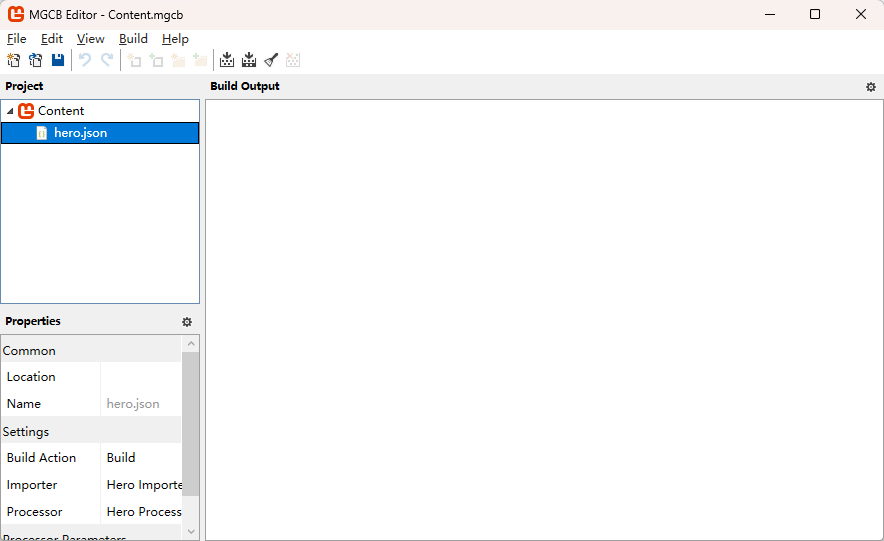
此时,我们的Game1类中就可以使用ContentManager加载自定义JSON资源了!和之前的规则一样,我们调用Content.Load<Hero>("hero"),传入字符串是.xnb的名字,但后缀可以省略,如果一切正常,会看到资源被正确读取。
protected override void LoadContent()
{
    _spriteBatch = new SpriteBatch(GraphicsDevice);
    _hero = Content.Load<Hero>("hero");
    Debug.WriteLine($"Hero: {_hero.Name} Lv{_hero.Level} HP{_hero.Hp} ATK{_hero.Attack} DEF{_hero.Defense}");
}
这里可能有人会有疑问,之前的HeroReader类在我们的代码里没有地方显式调用,它是怎么生效的?其实,.xnb中会保存资源读取器的类信息,游戏运行时HeroReader会自动被MonoGame框架反射加载,并用于反序列化.xnb中保存的二进制数据,这些类信息是写入器在GetRuntimeReader方法中写入.xnb的。
public override string GetRuntimeReader(TargetPlatform targetPlatform)
{
    return typeof(HeroReader).AssemblyQualifiedName;
}
另外一点值得说明的是,我们这里将整个解决方案划分为了两个工程,游戏工程依赖自定义管道工程,资源的实体类、Reader这两个游戏运行时所需的类也写在了自定义管道工程里,如果你有强迫症,也可以尝试将其划分为更解耦的架构,例如:
Gacfox.Demo.DemoGame.Shared # 数据模型、读取器
Gacfox.Demo.DemoGame # 主游戏工程
Gacfox.Demo.DemoGame.ContentPipeline # 自定义内容管道工程
这里出于篇幅考虑就不展开介绍了。
绕过内容管道直接加载
.xnb管道虽好,但有些时候我们就是想直接读文件,MonoGame也支持这么做,下面是一些例子代码。
// 从文件流加载并读取纹理
using var stream = TitleContainer.OpenStream("Content/ball.png");
Texture2D ball = Texture2D.FromStream(GraphicsDevice, stream);

// 读取文本文件
string json = File.ReadAllText("Content/data/items.json");
TitleContainer.OpenStream是个跨平台的文件打开辅助方法,它会把路径解析到程序运行目录下,注意用这种方式加载文件时,需要将其在Visual Studio中设置为复制到输出目录,且不要再将资源文件加入.mgcb,否则一个文件构建两份浪费构建时间和存储空间。
实际开发中,MGCB和运行时直接加载混用是常见的。前面例子中我们费了很大劲才把JSON“塞”进内容管道,但对JSON来说,这么做其实对于性能提升效果有限,JSON文本文件加载本身就已经很快了,转为.xnb还要自己写二进制序列化和反序列化(或引入MessagePack等),没准还会引入新Bug。以RPG游戏为例,实际项目可能用到大量JSON来定义物品、NPC、任务,这些数据文件可能频繁修改且需要热重载,游戏还可能需要读取玩家自制MOD,而将数据JSON加入内容管线则反而变成了阻碍。
总而言之,对于大部分独立游戏开发者来说,直接读取原始JSON是性价比更高的选择,只有在追求极端的资产规范化时,才可能考虑将其加入自定义管道,而那些解析复杂耗时且存量较多的资源文件,加入.xnb才真正有意义。